
AI model video for
apparel brands.
A flat lay can show a garment's colour, its print and its cut. It cannot show how it hangs on a shoulder, where the hem actually lands, or what the fabric does when someone turns. That is the gap apparel video fills, and it is the reason clothing gains more from this than any other wearable category.
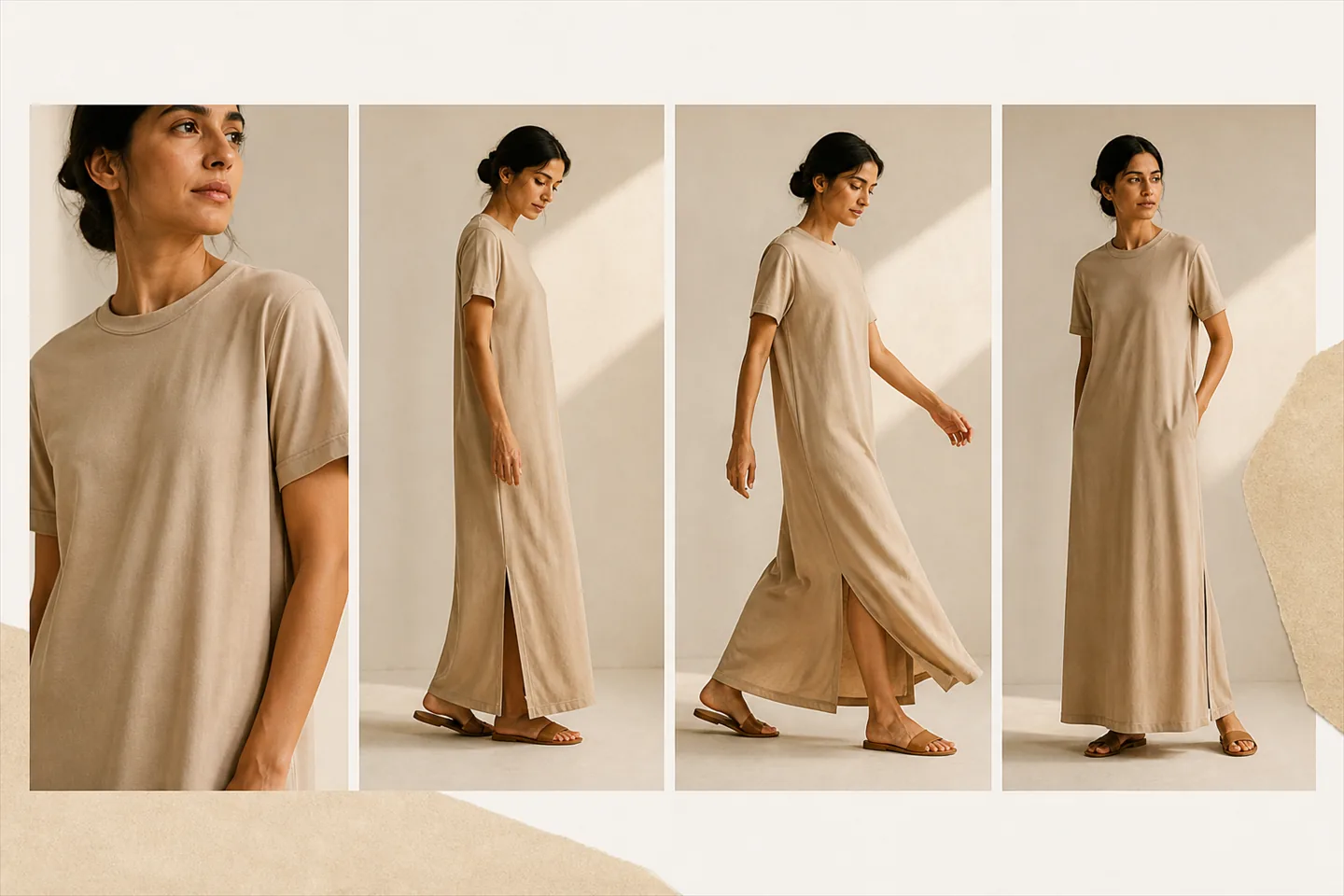
Drape and fit, not just colour One garment, several body types
Why does apparel need video more than a flat lay?
Because the questions a shopper has about clothing are all questions about movement. How does it hang. Does it cling. Where does the hem sit. A flat lay answers none of them, and a mannequin shot answers them badly, because a mannequin has one body and no motion. Apparel is the category where a still is furthest from the buying decision.
This is also why apparel is the category where generation has most to work with. A garment photographed flat carries enough information about its cut and its fabric weight for a model to infer how it should fall. The rendering is not guessing what the item is; it is applying it to a body and letting the shape follow from the cut you photographed.
Which garments gain most from video?
Anything that changes shape when it moves. Dresses, skirts, wide-leg trousers, knitwear, anything cut on the bias, anything with a drape or a flow. These are the items where a flat lay is actively misleading, because laid out on a board they read as flat panels of fabric rather than as a shape that will fall a particular way.
The garments that gain least are the ones a flat lay already describes well: a plain crew-neck tee, a rigid structured jacket, anything boxy in a heavy fabric. They will render fine, but the video tells the shopper little the photograph did not. If credits are tight, spend them on the pieces with movement in them. The order to work through is set out in where video pays back first.
Which body types should you show a garment on?
More than one, if the garment's fit is the thing customers ask about. The model gallery spans slim, lean, athletic, average, stocky, curvy, plus and tall builds across genders and ethnicities, and the same source photo can be run against several of them. Base AI models are on every plan, and all AI models including the premium ones are on the paid tiers.
This matters commercially rather than decoratively. A shopper who cannot see the garment on a body near their own is guessing, and a guess at checkout is a return waiting to happen. Showing one garment on two or three builds costs two or three stills at 1 credit each, which is the cheapest fit information you can put on a product page.
What does a flat lay need to show for clothing?
The whole garment, unobstructed, with its structure visible. Laid flat on a plain board, sleeves and hems in their natural position, nothing folded under. Where the photograph hides something, the generation invents something plausible in its place, and invented detail is where most disappointing apparel results come from.
The specific things worth checking before you spend a credit: the collar or neckline shape, button count and spacing, where the hem falls relative to the rest of the piece, the scale of any print across the body, and whether the fabric's weight is readable. If a folded sleeve hides the cuff, the cuff will be invented. The full checklist is in what a usable source photo looks like.
Where does apparel generation break?
On pattern continuity and on fine construction. A large repeating print across a wrap dress has to stay coherent as the fabric folds, and that is the single hardest thing in this category. Sheer and semi-sheer fabrics are the next hardest, because the model has to decide what shows through. Layered pieces, tie waists and complex fastenings are where an otherwise good render goes wrong.
None of that is a reason to avoid those garments, because they are also the ones video helps most. It is a reason to look at the still first. The two-stage flow exists precisely for this: you generate a try-on still for 1 credit, check the pattern and the fastenings on that, and only then spend 3 credits on a five second video or 6 on a ten second one. A bad result on a difficult dress costs one credit, not six.
What does one garment cost to put on a model?
One credit for the still, and three more if the still is good enough to animate into a five second clip. So a finished apparel video is 4 credits from scratch, and the free plan's ten credits a month is three finished videos or ten try-on stills. Failed generations are refunded automatically, and unused credits roll over to the next month up to twice your plan allowance.
Output is 1080p, in 9:16, 1:1 and 16:9 from a single generation, so the same render covers the product page and social without a second charge. There is no 2K or 4K option on any plan. The mechanics of the two-stage pipeline are covered on how a flat lay becomes model video.
About clothing.
Does it work on knitwear and heavy fabrics?
Yes, and knitwear is one of the categories that gains most, because weight and drape are exactly what a flat lay fails to communicate. What matters is that the source photo shows the knit structure clearly enough to be read. A tightly cropped or softly lit photograph of a cable knit will render as a smoother fabric than the real thing, so shoot it with enough light to see the texture.
Can I show the same dress on different body types?
Yes. That is one of the better uses of the credit system: one source photo, run against several models from the gallery, at 1 credit per try-on still. The gallery spans slim, lean, athletic, average, stocky, curvy, plus and tall builds. Base AI models are available on every plan and all AI models including premium ones are on the paid tiers.
What happens with a large print or a bold pattern?
Pattern continuity across folds is the hardest thing in apparel generation, and it is worth checking on the still before you render video. Look at whether the repeat stays consistent where the fabric turns, and whether the scale of the print reads correctly against the body. If it does not, regenerating the still costs 1 credit rather than the 3 a five second video would.
Will the colour match my actual garment?
Usually close, not guaranteed. Output is AI-generated, so colour, fit, drape and fine detail can differ from the physical piece, and you should review every render before publishing it. Shooting the flat lay in neutral light with accurate white balance gives the generation the best chance, because it can only work from the colour in the file you gave it.
Is a mannequin photo good enough as a source?
A flat lay is generally better. A mannequin shot already imposes a shape on the garment, and that shape then has to be reconciled with a different body, which introduces error the flat lay does not. If a mannequin image is all you have it will often work, but where you have both, use the flat lay on a plain background.
Start with the dress you cannot photograph well.
Ten credits a month, which is three finished videos or ten try-on stills. Enough to see what happens to your most difficult garment before you decide anything.